UK CAA Remote ID
Understanding the New UK CAA Remote ID (RID Rules) and How SwellPro Pilots Can Stay Compliant
From 1 January 2026, the UK Civil Aviation Authority (CAA) will introduce new requirements around Remote Identification (Remote ID or RID) for drones operating in UK airspace.
Remote ID is often described as a digital licence plate for drones. It allows a drone to broadcast identification and location information while in flight, helping regulators and authorised bodies understand who is flying and where.
You can read the official CAA guidance here:
https://www.caa.co.uk/drones/moving-on-to-more-advanced-flying/remote-id-rid/

What Is Remote ID (RID)?
Remote ID allows drones to broadcast information such as:
- Drone serial number or unique identifier
- Operator ID
- Drone position and altitude
- Flight direction and speed
- Take-off location
This information is transmitted locally using wireless technologies such as Wi-Fi or Bluetooth and can be received by authorised systems used by regulators or enforcement agencies.
CAA Remote ID overview:
https://www.caa.co.uk/drones/moving-on-to-more-advanced-flying/remote-id-rid/
When Do You Need Remote ID?
Under current CAA guidance:
- From 1 January 2026, class-marked drones must have Remote ID active.
- Some legacy and lower-weight drones may have a transition period until 1 January 2028.
This means pilots should begin planning now, especially if flying drones that do not already include built-in Remote ID.
What About DJI Drones?
Most newer DJI consumer and enterprise drones already include Remote ID capability built into the aircraft firmware. In these cases, Remote ID can usually be enabled through the flight app once the feature is supported in the UK.
However, many waterproof drones, fishing drones, older aircraft, and specialist platforms do not currently include native Remote ID hardware. This is particularly relevant for:
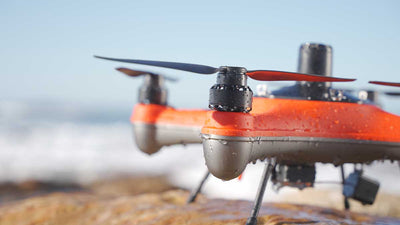
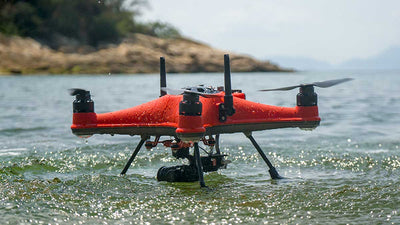
- SwellPro waterproof drones
- Fishing drones
- Custom built or modified drones
- Older non class marked aircraft
For these platforms, an external Remote ID transmitter provides a simple path to compliance.
A Simple Solution for SwellPro Pilots – Aero Ping
The Aero Ping Real-Time Drone Transponder is a compact Remote ID transmitter designed to add e-Identification capability to almost any drone.
Product page:
https://swellpro-uk.co.uk/products/aero-ping
Key Features
- Lightweight and compact design
- Attaches easily to most drones (velcro strips are included, but straps can also be used)
- Broadcasts Remote ID and location data via Wi-Fi and Bluetooth
- Supports 3D location and take off position reporting
- Long battery life (up to approximately 14 hours)
- Ideal for drones without built in RID
For SwellPro owners, Aero Ping provides a practical way to prepare for Remote ID without replacing the aircraft.

Why Remote ID Matters for Waterproof and Fishing Drones
SwellPro drones are commonly used for:
- Fishing bait deployment
- Water sampling
- Marine inspection
- Coastal photography and video
Many of these operations take place in sensitive or busy environments. Remote ID helps demonstrate responsible use and shows that pilots are operating transparently and within UK regulations.
Using Aero Ping alongside your SwellPro drone helps future proof your setup and reduces the risk of compliance issues.
How to Prepare Now
- Ensure your CAA Operator ID is valid
- Check whether your drone has built in Remote ID
- If not, install a Remote ID transmitter such as Aero Ping
- Keep firmware and devices up to date
AeroPing FAQs
What is the cost of an AeroPing?
How much does an AeroPing weigh?
Where on my drone do I put my AeroPing?
How do I attach my AeroPing to a drone?
How do I set up my AeroPing?
- Ensure the module is fully charged
- Switch AeroPing to SET
- Open your mobile device Wi-Fi settings
- Wait a few seconds for AeroPing-Config to appear
- Select AeroPing-Config
- A new window should open automatically
- Complete the required credentials
- Click Submit
- Confirm the success message
- Once the STAT LED remains solid green, you are ready to fly
Is AeroPing waterproof?
What do the flashing lights mean?
- Glowing red STAT – device requires setting up
- Red and green flashing STAT and CHG – connection is being established
- Solid green STAT – connection established and AeroPing is ready to fly
- Red CHG – device requires charging
I can’t find “AeroPing-Config” in my Wi-Fi list
How do I charge my AeroPing?
What is the recommended charge time?
Can an AeroPing be used on multiple drones?
How do I track my drone with AeroPing?
- UK (Android): OpenDroneID
- USA (Apple and Android): DroneScanner
How quickly will I receive my AeroPing?
How can I update my AeroPing credentials, including “Operator Description”?
What do I enter into the “Operator ID” field?
What do I enter into the “Operator Description” field?
My AeroPing is flashing red and green and can’t connect
Final Thoughts
Remote ID represents a significant step in the evolution of UK drone operations. It is designed to improve airspace safety, support enforcement, and enable the long term growth of drone activity.
For SwellPro pilots and operators of specialist waterproof drones, adding an external Remote ID solution such as Aero Ping is one of the easiest ways to stay ahead of the new rules.